What to do when DCC used to work...
but suddenly quits:
For reasons that are not yet clear, mIRC will suddenly stop sending or receiving DCC chats or files. This seems to happen even when mIRC has always functioned perfectly up to now, and even when you, the user, have changed absolutely nothing.
One school of thought holds that mIRC itself is the culprit. That is, because of a "bug" in its programming, mIRC loses the information it needs to send and receive DCC's. Another school of thought blames an accessory script called WaveGet which modifies important mIRC's files and writes other information into the mIRC directory. Regardless of which is the case, you can fix the problem yourself quickly and easily.
What happens:
Look... just skip this explanation stuff and get me to the "fixit" part!
In order to make a Direct Client to Client (DCC) connection - i.e. to connect your computer directly to someone elses computer for chat or file transfer - mIRC must know the unique identifying name of your computer when it is logged onto the internet. This name, called an "IP address," is assigned to your computer by your provider each time you dial up and log on.
This "IP address" is dynamic, that is it changes each time you log on. What that means is that your "IP address" is rarely the same twice in a row. Because the "IP address" changes with each logon, mIRC must find out your current "IP address" each time it goes on line. MIRC does this through its "Setup Info" which you filled in the first time you installed mIRC, but may not have seen since.
The "Setup Info" can be seen by clicking the "Setup Info" icon (  - 3rd from the left) then clicking on the "Local Info" file tab. (See below.)

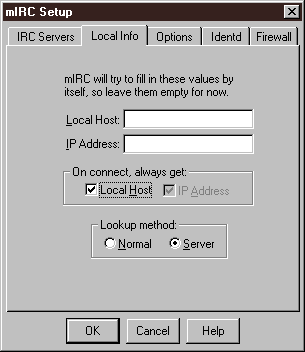
Notice in the picture above that there is information in the two boxes labelled "Local Host" and "IP Address." That information is there because mIRC put it there after I dialed in and logged on. Notice also that the two check boxes labelled "Local Host" and "IP Address" are both checked. If one or both of these boxes is unchecked, mIRC will not get the information it needs and another person who wants to DCC with you cannot do so, because this information will not be filled in.
How to fix it: (important info)
If your DCC chat or send function suddenly stops working, you may need to re-enter the "Setup Info." This will cause mIRC to properly ask your provider for your "IP Address" when you log on. To do that, go through the following steps: (See illustration below.)
1. Start mIRC
2. Click on the "Setup Info" icon (3rd from left)
3. Click on the "Local Info" file tab
4. IMPORTANT!!: ERASE ALL INFORMATION in both the "Local Host" and "IP Address" boxes.
(MIRC will fill this information in itself the next time you log on.)
5. Be sure BOTH BOXES in the section labelled "On connect always get" ARE CHECKED. (I.e., both "Local Host" and "IP Address" must be checked.)
Note: You may have to uncheck one or both boxes and then recheck them to get both boxes checked. DO NOT click on "OK" until BOTH are checked.
4. When the dialog window looks like the one below, click on "OK" to exit
5. Rejoin your favorite server by clicking on the "Connect to IRC Server" icon  (far left)
Remember:
It may be necessary to repeat this process if mIRC should again lose the Local Host information, or if the information fails to change when you log on. If the problem resides in mIRC itself, future versions no doubt will fix the "bug." If the problem comes from an accessory program, like WaveGet, future versions of that program should address it. Until then, this fix is quick and easy.
See you on the channel...
| Home Page | General Info | The OPs | How To Info | F.A.Q. |
| Scripts | Channel Users | Newsletter |
 This page is maintained by Smitty, (ac5c@oklahoma.net) and was designed by _Bubba (ahbaker@theologie.uni-erlangen.de). Both can be found and/or contacted on DALNet's #50+retired channel, or through DALNet MemoServ. Absolutely nothing here is copyrighted by us, and it probably wouldn't matter even if it were. Take whatever you want, and if it will make you feel any better to take credit also for our original work we invite you to go ahead... we can always make more. If you have praise or contributions for the page, please email us right away. For all other matters please click here.