
When you run gamespy you will probably want to just double click on a server and connect. But in many cases the settings to run Quake 3 from the command line will not be the ones you want. To allow you to use more RAM then 56 and to make sure you are running the correct MOD do the following:
Click on the Games and Filters button in the tool bar and you will open up the next form.
|
You will need to scroll down to where you see the Quake 3 Arena settings. And where it says Command line, you want to edit that option. You are going to be setting com_hunkmegs to allow quak3 to use more RAM. Use the following chart to set this variable. The general rule is to leave 32MB of RAM for "other" processes and to allocate about 3/4 of your RAM for quake to use. You can also not allocate 256MB to this variable so something below that needs to be used.
|
 |
After clicking on that option box you will enter the next form.
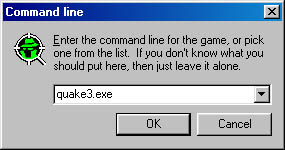 |
Add to this line the following: +set com_hunkmegs XXX. Where XXX is the amount of ram you want Q3 to use. Now if you are just using gamespy to run WFA you can add the line +set fs_game WFA to this line to make sure that you run the right files. If you also use gamespy for other MODs and DM, you might want to consider not using that setting... since it is opt to load WFA instead? So your command line should look something like this: quake3.exe +set com_hunkmegs 192 +set fs_game wfa |
© 2000 HellBringer [IH]