How To Close that dumb Advertisement window on Altavista's
Free Internet.
For those of you that don't know by now you can get the internet for free now. The only price you have to pay is to have a dumb window setting on top of everything you do, but as you can see i found away around it. It took me a hour before i had it figured out. These are the five easy steps.
Step1: Connect to Altavista's Free Internet
Step2: Wait until you see the Advertisement window start to load.
(The window should be gray.)
Step3: Hit Ctrl+Alt+Del
Step4: Close the 2nd of the two FreeAv's. Then close the other one.
(If You only see one then you have hit Ctrl+Alt+Del to soon.)
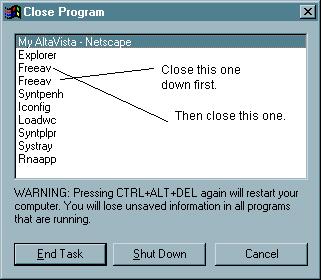
Step5: You are done. Now you can browse the web for free with out
having a dumb advertisement setting on top of your work.
NOTE: You must follow these steps as they are given. Closing the windows
to soon or to late
will disconnect you from the internet. Do not write to me telling me
you can't get it to work. If you
can't get it to work you must not know how to read.
Written By: Kraek@tfz.net