So far we have learned how we can store a really big number using a relatively small number of zero's and ones. While that is great, it is not going to get us very far. Some problems we still have are: How do we get the number into storage? How can we have more than one number?
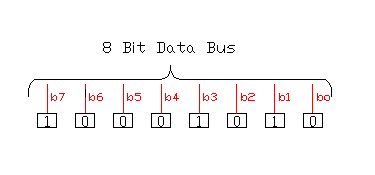
Unless said otherwise, all of this discussion will be based upon memory one byte (8 bits) wide. The following picture is a diagram representing our byte of memory.
Memory has two important modes of operation. First, we need to be able to put the data into the memory. We will call this operation "writing" to the memory. Second, we need to be able to get the number of the memory. We will call that "reading" to the memory. When something is written into memory it writes over the information already stored in the memory, When the memory is read, the data remains in the memory and can be read again.
To do this we could have two wires going to the memory. One wire could be called "R for read and the other wire could be called "W for write. Since all of the data in one byte is to be written to or be read from at the same time, each wire can go to all of memory cells.
Whenever the R wire is turned on the memory will place the data inside it on the data bus and whenever the H wire is turned on the memory will take whatever is on the data bus and store it in the memory. Some memory circuits were designed this way, but then someone came up with the observation: "If I am not reading from memory, then I must be writing to memory." Now we can use just one wire. The wire usually is written with an "R" followed by a "/" and this is followed with a "W" with a line over it. This means Read - Not Write and when the wire is "ON" the memory is being told to provide its contents to the data bus (Read) and when the wire is "OFF" the memory is being told to store the value on the data bus (Write).
Because the Read/Write line controls how the memory acts, it is part of a grouping of lines called the control bus. For now it is the only control bus line we have. More will be coming.
Now our memory drawing looks like this:

Notice this picture looks just like the previous one with the addition of the single read/not write line interesting each memory cell. All cells will be read or written to at the same time.
To store several of our 8 bit bytes of memory we can connect the 8 bit collection of cells together as shown in the following diagram.

Note the following things about this diagram:
The point of this is that each memory byte can be connected to the data bus by enabling the address wire associated with it. There is one minor problem with what we have discussed so far. Since all of the b0 cells are connected together, how is it that we only read or write just the cell we of the memory address we want? Each of the cells now has a "gate" associated with it. If the cell is not enabled by the address wire connected to it, the gate does not connect the cell to the data bus line. This is referred to as "tri-state memory" because it has three states: off, on, and not communicating.
The last drawing was starting to get a little complicated. All of those internal connections were just a lot of "stuff" getting in our way. Also, we are showing a wire for each and every address. Even the personal computers of the 1970's had 65,536 memory address locations. That would be a lot of wires! The following picture is getting closer to the concept we will use. 
Note the following things about this diagram:
For some reason I am not sure of, traditionally the available address space is twice as many bits as the data width. In other words, an 8 bit machine, 8 data bits, would have 16 bits of address. This means each memory location could hold a number from 0 to 255, but there could be 65,536 memory locations. A 16 bit machine could hod a number from 0 to 65,535 and would have 32 bit or 4,294,967,296 address locations. See how the drawing could get complicated really fast!
The mental picture you need to have of computer memory is a long set of slots. Much like the mail box slots companies use for internal mail. Each slot can contain a number and the size of this number depends upon the bit width of the memory. Each slot has an address and that is how the computer knows where to put the data or to read the data.