 |
This can cause many problems. For one, from a chaotic point of view this can cause more frustration than you are willing to deal with. Changes that affect your system's performance may need to be changed or maybe someone with a reason changed them for you. Though that is all just water under the bridge, here I will discuss some basic ways to overcome your frustration, and hopefully get on with what it was you wanted to do in the first place.
**Disclaimer** - PC CIRCUS, will not be held responsible for any damages to your system. Use the information in this article at your own risk.
For some reason your system may have reverted to its default password, if so try these as passwords: AMI, Award, bios, setup, cmos, AMI_SW (case sensitive).
NOTE: For Award BIOS, AWARD_SW (case sensitive) should even override a set password! If not, also try j262.
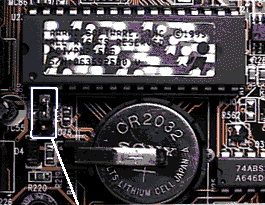
If you have not had any luck yet, do not despair. Look in your motherboard/PC
manual for the jumpers that reset the CMOS.
If you are one of the unfortunate people of which do not recieve a
manual, because the store you bought the computer/motherboard from convienantly
forgot to give you one. (YOU KNOW WHO YOU ARE!) then please go HERE
to identify your motherboard/PC and hopefully you will get some relief.
|
|
IT is possible though that you may not find a jumper, but keep looking you may not notice it until it jumps out and snacks a bite out of your nose!
IF ALL ELSE FAILS: It may be necessary to remove the CMOS battery (that
is, if it is not soldered to the motherboard).
This should be reletively easy.
Remove the battery (double sure the system is off, OK just checking ) wait a few minutes then reinstall the battery, and ensure anything that you unplugged or misplaced to get to the battery is back in it's original place.
If you are one of those people that nothing goes right for, and the Battery is soldered to the motherboard, I would strongly suggest taking your computer into the nearest repair shop, (SO they can try to sell you a new one!!!).
Now if you have hopefully done all of the steps successfully and you find that there is still a password, it is possible that the motherboard reverted back to a default password such as Award, for Award and AMI for American Megatrends, etc, etc.
I hope this has helped you!
PC CIRCUS
Manufacturers HardDrives Mouse/Keyboards Security Search Zip Drives Scanners Sound Education