#50+retired onDalNet
How To..... Ignore Someone in IRC

From time to time a user appears on #50+retired who is difficult to bear. If a user is profane, insulting or invading your privacy, it is important to let one of the OPs know right away. If an OP can detect that a user is misbehaving, the OP may either warn or eliminate the user at the OP's discretion.
But what if the OP can't determine any misbehavior? Or what if the OP just won't "kick" someone you're tired of dealing with? For that matter, what if there isn't an OP present at all? Is it possible to keep an annoying or profane user from bothering you under those circumstances? YOU BET IT IS!!! And here's how to do it:
Your IRC program has several "mode" controls available. Some of them, as you probably know, are for control of an IRC channel and/or its users. Other "mode" controls are specific to individual users and controlled by the user, rather than by channel OPs or others. One of these controls can be used to limit external invitations from outside of the channel, and combined with the "ignore" command, can silence one or more users you do not wish to hear or see.
These two features are the "invisible" mode and the "ignore" command, which can be invoked from the command line or by means of "popup" commands. Let's begin with the "invisible" mode since it is the simpler of these two features:
The /mode [nickname] +i command:
To become "invisible" to outside invitations or notices, except to those who know the exact spelling of your nick, type:
/mode [currentnick] +i
Note: This is NOT literal invisibility. Your nick will show up on channel and other lists and you can still receive messages and notices, even from off the channel(s) you are logged onto. What "invisible" means is that "global" notices will not open "msg windows" or show up in your current channel window unless the sender of the "global" specifically spells out your nick and does so exactly correctly (no wildcards, etc.) Those notices may still appear in your "status" window, however, depending on the other configuration of your IRC program.
If you don't like the many "global" invites and "notices" that appear from time to time, it's a good idea to have your IRC program execute the /mode [currentnick] +i command as soon as you log on to a server. You can do this in mIRC by inserting the command in the "perform" section as follows:
1) Select the "general options" icon  then click on the "perform" file tab (see below)
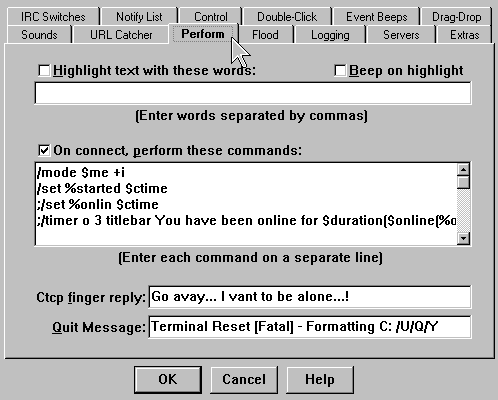
2)Type this command: /mode $me +i on a line by itself and click the "OK" button.
Now, each time you log onto a server, mIRC will automatically set you to "invisible" mode.
The second means of silencing annoying users and messages in a channel is by using the "ignore" command. This is the most effective, and controllable means of "ignoring" and is worth learning.
The /ignore command:
Ignoring a single user is quite simple. If you type the command:
/ignore [nickname]
and press [enter] you will no longer see anything [nickname] sends to the channel window, even though you will still see [nickname]'s nick in the list, and [nickname] will see everything you type.
However, this is only limited relief, because [nickname] can always change to [nick2name] and continue to heckle or annoy you. To prevent this, it is possible to "ignore" any nickname a user might choose. To do this you add a "mask" number to the command as follows:
/ignore [nickname] 3
This will "ignore" any nickname at the log on point (ISP) of the nickname given. Thus, if [nickname] changes his/her nick to [anynick] , he/she is still ignored until or unless he/she logs onto a different Internet Service Provider and rejoins the channel.
All may seem well and good now, and frequently this works well, but it still may not be enough! Even when "ignored" with a "mask" in the channel, it is still possible for an annoying user to reach you by using the "notice," "query" or "DCC chat" commands. To control this, you need to add "qualifiers" to your ignore command above that tell it to ignore private messages, notices, queries and DCC requests from the [nickname] specified. You can do that by using the command:
/ignore -pcnti [nickname] 3
p = private messages (such as a "query")
c = channel messages
n = notices (inside or outside of the channel window)
t = CTCP requests (for chat or file transfer)
i = invites (from within or outside of the channel)
This will pretty well mute any annoying user, though they remain on the channel and remain able to see everything you send to the channel.
Just one last little detail: Suppose you've effectively silenced someone, but you don't want it to last forever, but just say for ten minutes of peaceful silence... How do you remove the "ignore" from someone so that you can see/hear them again?
There are three ways to remove an "ignore" once it is set. The first two are "manual" and the third is "automatic" and is set at the time you invoke the "ignore" command:
1) From the command line, type a command similar to the one you used originally to "ignore" [nickname], but add the -r switch to "remove" the "ignore" command, as follows:
/ignore off (to turn off all ignores)
/ignore -r [nickname] 3
2) In mIRC click on the "general options" icon (4th from the left) and choose the "control" file tab (see below).
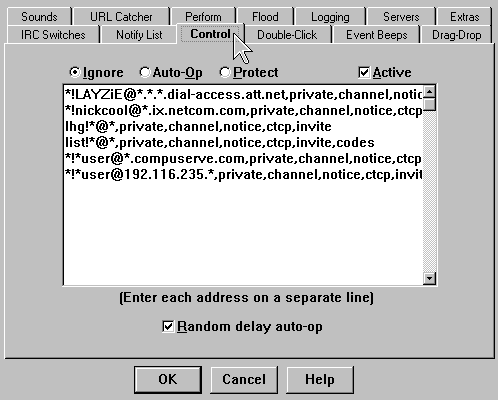
Click the "ignore" "radio button" (see above) to see the list of active "ignores." Then delete the line(s) you no longer want to ignore.
3) To set an "ignore" for a specified length of time that will automatically remove itself after that time has elapsed, AT THE TIME YOU FIRST SET THE IGNORE add the "u" command followed by the number of seconds for the "ignore" to last making the command:
/ignore -pcntiu[seconds] [nickname] 3
For example, to ignore a user named "trash_mouth" for 30 minutes and have the "ignore" automatically removed after 30 minutes, type:
/ignore -pcntiu1800 trash_mouth 3
Remember... though you are "ignoring" [nickname] and see nothing he/she types, he/she continues to see everything you type. It's a good idea to watch what you say and just count the blessings of silence now at your control. Remember also that mIRC retains "ignores" between sessions, so remove "ignores" from the list maintained by mIRC, or you will never see [nickname] speak again.
We hope you never have to use the command at all. See you on #50+retired!!
Smitty (AC5C_Okla)
Arch (_Bubba/wa5nfp)
| Home Page | General Info | The OPs | How To Info | F.A.Q. | Scripts | Channel Users |
 This page is maintained by Smitty,
(ac5c@oklahoma.net) and was designed
by _Bubba
(ahbaker@theologie.uni-erlangen.de).
Both can be found and/or contacted on DALNet's #50+retired channel, or
through DALNet MemoServ. Absolutely nothing here is
copyrighted by us, and it probably wouldn't matter even if it were.
Take whatever you want, and if it will make you feel any better to take
credit also for our original work we invite you to go ahead... we can always
make more. If you have praise or contributions for the page, please email us
right away. For all other matters please
click here.
This page is maintained by Smitty,
(ac5c@oklahoma.net) and was designed
by _Bubba
(ahbaker@theologie.uni-erlangen.de).
Both can be found and/or contacted on DALNet's #50+retired channel, or
through DALNet MemoServ. Absolutely nothing here is
copyrighted by us, and it probably wouldn't matter even if it were.
Take whatever you want, and if it will make you feel any better to take
credit also for our original work we invite you to go ahead... we can always
make more. If you have praise or contributions for the page, please email us
right away. For all other matters please
click here.