#50+retired onDalNet
How To..... play sounds in mIRC

Step I:
Be sure that mIRC is configured to receive sound by clicking on the "options" button  and selecting the "sounds" file tab (see fig. below)
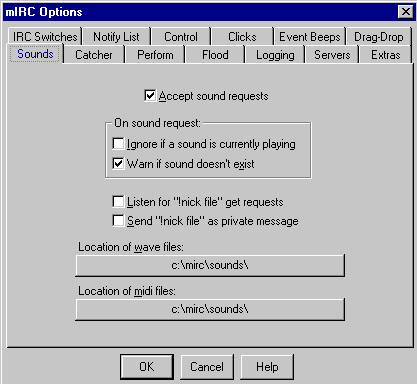
Be certain that the "accept sound requests" box is checked. Also make certain that the directories specified for sound files are correct, and that the directory(ies) actually exist(s), then click "OK." Note: The default installation of mIRC 5.31 sets the program to look for sound files in the mirc\sounds directory. In fact, if the directory does not already exist when you install or upgrade the program, it will offer to make it for you. You should accept this offer. You may change the default sound directory at any time, as long as you name a directory that actually exists somewhere on your computer's hard drive.
Step II:
Make certain that there is at least one .wav or .mid file in the sound directory specified above. We suggest that you begin with the #50+retired "Super Sounds Starter Set" which you will find on the #50+retired Scripts Page.
Step III:
Note: In order to trigger a sound on another person's computer, they must already have the desired sound file (.wav or .mid) in the proper directory where mIRC will look for it, and they must also have the "accept sound requests" box checked in their program configuration. If they do not have the file, you can DCC send it to them.
The command to play a sound (to yourself and to the channel) is: /sound <filename.wav> or /sound <filename.mid>. So, to play the file that sounds like a doorbell from the "Super Sounds Starter Set" you would type:
/sound doorbl.wav <enter>
That's all there is to it... really. The hard work is in collecting sound files and remembering the names. There are a number of simple scripts and popups that can assist you in the latter, and .wav and .mid files abound on the WWW. Just log onto any search engine and type in "sounds." Don't forget to check the Scripts Page also for new ways to select and control sounds in mIRC.
| Home Page | General Info | The OPs | How To Info | F.A.Q. | Scripts | Users |
 This page is maintained by Smitty,
(ac5c@oklahoma.net) and was designed
by _Bubba
(ahbaker@theologie.uni-erlangen.de).
Both can be found and/or contacted on DALNet's #50+retired channel, or
through DALNet MemoServ. Absolutely nothing here is
copyrighted by us, and it probably wouldn't matter even if it were.
Take whatever you want, and if it will make you feel any better to take
credit also for our original work we invite you to go ahead... we can always
make more. If you have praise or contributions for the page, please email us
right away. For all other matters please
click here.
This page is maintained by Smitty,
(ac5c@oklahoma.net) and was designed
by _Bubba
(ahbaker@theologie.uni-erlangen.de).
Both can be found and/or contacted on DALNet's #50+retired channel, or
through DALNet MemoServ. Absolutely nothing here is
copyrighted by us, and it probably wouldn't matter even if it were.
Take whatever you want, and if it will make you feel any better to take
credit also for our original work we invite you to go ahead... we can always
make more. If you have praise or contributions for the page, please email us
right away. For all other matters please
click here.